
Prerequisites
Read these first if inodes, hard links, or symbolic links are new.
- inode(7) — metadata and data blocks live on the inode; names live in directories
- link(2) — another name for the same inode (hard link)
- symlink(7) — a path pointer, not a second name for the same bytes
- ln(1) — the command that creates either kind
When two paths are not two files
ls shows two filenames; stat tells you whether you are looking at one file or a pointer. Mix them up and you get silent data loss (delete the “original” but the hard link still works), broken deploy scripts (symlink target moved), or inode exhaustion (hard links to a directory — not allowed).
The distinction matters outside textbook examples. This repo’s local Writing preview hard-links markdown and images into the public Jekyll checkout so localhost reads the same bytes without copying. That only works because hard links share an inode — the same mechanism as ln on a post file.
Hard links — alternate names, one inode
A hard link is another directory entry for the same inode. Same metadata, same data blocks, same link count.
ln original.txt link.txt
ls -li original.txt link.txt   # identical inode column
| Property | Behavior |
|---|---|
| Inode | Same for every hard link |
| Link count | Increments with each ln |
| Edit one name | All names see the change |
| Delete one name | Others remain until link count hits zero |
| Cross filesystem | No — inode numbers are per filesystem |
| Directories | No (cycles would break traversal) |
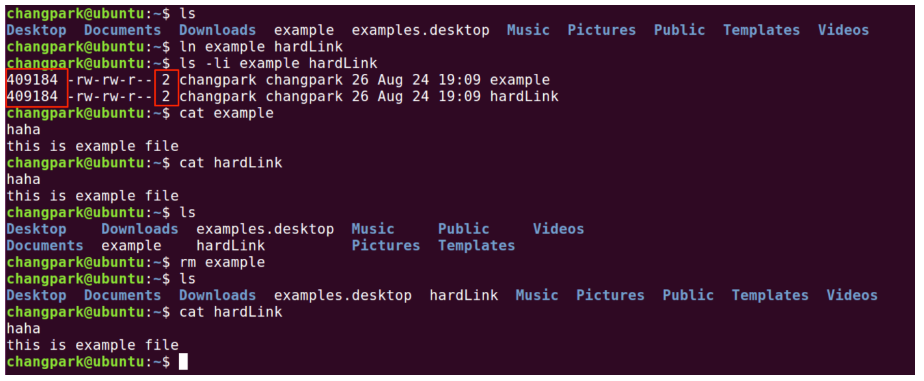
Figure 1. Hard links — two names, one inode, one file object.
Hard links are how Unix keeps a file alive under multiple paths. There is no “master” name — deleting original.txt leaves link.txt fully usable.
Concrete check:
echo hello > original.txt
ln original.txt link.txt
stat -c '%i %h %n' original.txt link.txt
# same inode (first column), link count 2, two paths
rm original.txt
cat link.txt    # still prints hello
Symbolic links — path indirection
A symlink (soft link) is a small file whose contents are a path string. It has its own inode; it points at another path, not another inode directly.
ln -s original.txt link.txt
ls -li original.txt link.txt   # different inodes
readlink link.txt              # original.txt
| Property | Behavior |
|---|---|
| Inode | Different from the target |
| Link count of target | Unchanged |
| Edit through symlink | Writes go to the resolved target |
| Delete target | Symlink dangles (ELOOP / “No such file”) |
| Cross filesystem | Yes |
| Directories | Allowed (with care — relative vs absolute targets) |
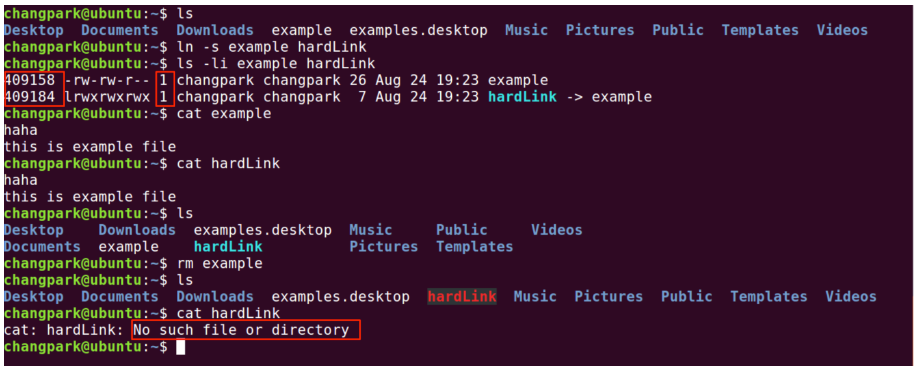
Figure 2. Hard link vs symlink — inode sharing vs path pointer.
Symlinks behave like Windows shortcuts: convenient, but fragile when the target moves.
Choosing in practice
| Need | Prefer |
|---|---|
| Two names, same file, no extra indirection | Hard link |
| Alias across filesystems or to a directory | Symlink |
| Backup / mirror that survives deleting one path name | Hard link (same fs) |
Versioned release path (current → v2.3) |
Symlink |
Rule of thumb - if both paths must always refer to the same bytes on disk, hard link. If you need a redirect that can be repointed, symlink.
Hard links in this Writing workflow
The public site repo (changminpark.github.io) previews drafts by hard-linking from this private repo:
# from changminpark.github.io — see serve-local.sh
export PERSONAL_WEBSITE_WRITING="$HOME/Personal/personal-website-writing"
./serve-local.sh    # hard-links _posts/ and images/posts/ into the site tree
Edits here appear instantly in the local Jekyll tree because this post’s markdown and the linked copy are the same inode — not an rsync copy, not a symlink to a folder. The same goes for images/posts/<permalink>/thumbnail.png: edit the PNG here and the Writing list thumbnail updates on the next refresh, with no separate sync step. Re-run serve-local.sh after adding or removing posts so new files get linked, and clean up links for posts you delete.
Symlinks would also “work” for preview, but hard links avoid an extra indirection layer and keep permissions and tooling behavior closer to a normal file. When something looks stale in localhost, check whether the hard link still exists (ls -li in both trees) before blaming Jekyll caching.
References
man 1 ln,man 2 link,man 7 symlink— Linux programmer’s manual- Filesystem Hierarchy Standard (FHS) — where link semantics show up in package layouts