
Prerequisites
Read these first if Binder, ANR, ART, Zygote, or HAL are new.
- Platform architecture — app → framework → HAL → kernel stack
- Binder IPC — how Android processes talk across boundaries
- ANRs — when the main thread is blocked too long
- Android Runtime (ART) — where bytecode actually runs
- HAL overview — hardware abstraction below the framework
Why the layer map matters
The first time I chased an Android bug by staring only at my Activity, I wasted an afternoon. The symptom looked like app logic — a list that stopped updating — but the root cause was a framework service blocking on Binder. Without a mental map of the stack, every stall feels like “my code is wrong” when the contract you violated might be two layers down.
Android is a Linux-based stack with five familiar tiers. Treat each tier as a boundary with its own failure modes, not a glossary entry. When something breaks, name the layer before you rewrite UI code.
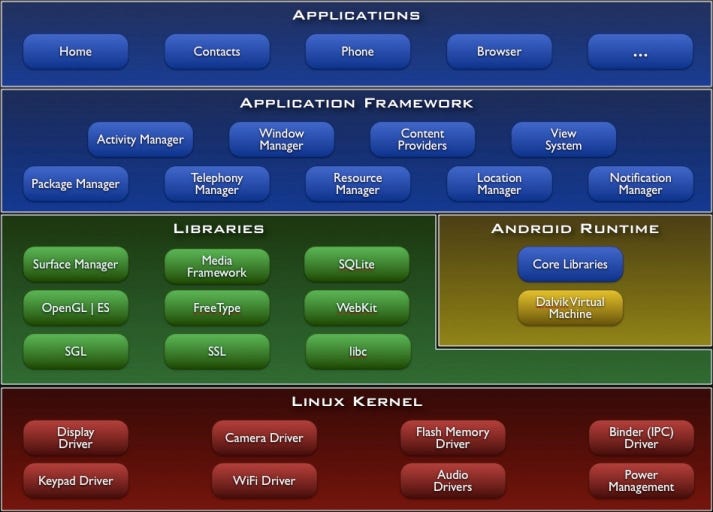
Figure 1. Classic Android platform layers — apps at the top, kernel at the bottom.
Applications — where symptoms show up
The top layer is every APK you ship plus preinstalled system apps. This is where crashes surface in Logcat, where ANR dialogs name your main thread, and where profilers attach.
That visibility is misleading. An ANR trace that points at Activity.onCreate() often means your main thread waited on work that belongs elsewhere — a synchronous Binder call into ActivityManager, a blocking disk read that should have moved off-UI, or a deadlock in your own code. The stack trace starts in your Activity; the contract you broke might be in the framework or in how you used it.
Rule of thumb: if the bug reproduces only when you call a framework API a certain way, suspect the framework boundary before rewriting business logic.
Application Framework — the API you actually code against
Activity, Service, ContentProvider, BroadcastReceiver, WindowManager, permissions, notifications — all live here. Framework services run as separate system processes and expose themselves through Binder IPC. Your app process calls stub proxies; the real work happens in system_server or a dedicated daemon.
That split explains a lot of “random” production weirdness:
- ANR on a trivial UI path — main thread blocked waiting for a synchronous system call (location, account lookup, package query) that should have been async or cached.
- SecurityException despite declaring a permission — the permission grant is enforced in the framework; your manifest line is only the request, not the guarantee.
- Works on emulator, fails on device — HAL or vendor policy differences surface through framework APIs long before you touch the kernel.
When debugging, ask: am I violating a framework contract (thread, lifecycle, exported component), or is the system service itself unhealthy? Systrace and dumpsys activity often answer that faster than another refactor of your ViewModel.
Android Runtime — one process, one VM instance
Each app process runs its own instance of the Android Runtime (ART) today. ART executes DEX bytecode — the format Dalvik pioneered — and handles garbage collection, JIT/AOT compilation, and JNI transitions.
Runtime-layer bugs feel like memory or performance ghosts: sudden GC pauses, OutOfMemoryError on large bitmaps, native heap corruption after a bad JNI call. They rarely look like “wrong button color.”
Boot performance ties back here through Zygote: at startup the system forks a pre-warmed process that already loaded core framework classes. Your app inherits that work via copy-on-write, which is why cold start is not “spawn a fresh JVM from zero” on every tap. When Zygote or ART misbehaves, every app launch looks broken — a strong signal you are below the framework.
Libraries and native code — the glue under Java/Kotlin
Below ART sit native libraries: SQLite, OpenGL ES, WebKit, media codecs, SSL, and the Hardware Abstraction Layer (HAL) that talks to drivers without exposing vendor blobs to apps. Many “Android APIs” are thin Java/Kotlin wrappers over C++.
JNI crashes (SIGSEGV in libsomething.so), camera preview glitches, and codec failures often land here. Your Kotlin stack trace stops at native; the fix is in buffer lifetime, thread affinity, or a vendor HAL quirk — not in your Kotlin UI code.
Linux Kernel — scheduling, memory, and the real sandbox
The kernel schedules processes, maps memory, routes I/O, and enforces UID separation. Android adds Binder as a kernel driver for IPC and wake locks for power policy. App sandboxing starts here: each app gets a unique Linux UID; the kernel denies cross-app file access unless you explicitly share data through a mediated API.
Symptoms at this layer are blunt: reboot loops, driver panics, storage corruption, or an exploit chain that already escaped userspace. Normal app developers rarely patch the kernel — but knowing that UID + SELinux sit below your APK explains why “just read /data/data/other.app/” never works on a stock device.
Start from the symptom
| Symptom | Likely layer to inspect first |
|---|---|
| UI freeze + ANR dialog | Main thread + framework Binder calls |
SecurityException on intent |
Framework permissions / exported flags |
| OOM / GC churn | ART + your allocations / leaks |
Native crash in lib*.so |
JNI + HAL / vendor libs |
| Cross-app data leak | Kernel UID + SELinux + your exported components |
Naming the layer does not fix the bug. It stops you from fixing the wrong one for an afternoon.
References
- Architecture overview — Android Open Source Project
- Application Sandbox — AOSP Security
- Low memory killer / LMKD — when the kernel, not your Activity, owns the “crash”