
Prerequisites
Read these first if Unix paths, mount points, or the Filesystem Hierarchy Standard are new.
- Filesystem Hierarchy Standard 3.0 — what
/,/etc,/var, and/procare for - path_resolution(7) — how the kernel turns a path string into a file
- proc(5) —
/procas a live kernel view, not a disk directory
When the filesystem layout is the bug
A service fails after reboot, disk alerts fire at 3 a.m., or strace shows ENOENT on a path that “worked yesterday.” The FHS tree looks like a vocabulary quiz — /bin, /lib, fourteen more top-level names — but in production you rarely need all of them equally. Three directories explain most surprises I have seen on servers and dev boards: /proc for live state, /etc for config that outlives your editor session, and /var for data that grows until the disk is full.
This is not a tour of every mount point. It is the problem-first map I wish I had before I knew where Linux keeps the truth.
A mental model, not a catalog
Everything hangs off / — one unified tree, even when pieces live on different block devices or network mounts. User commands and boot-critical tools split between /bin and /usr/bin on modern distros (merged-/usr layouts blur the line), but the failure modes cluster elsewhere.
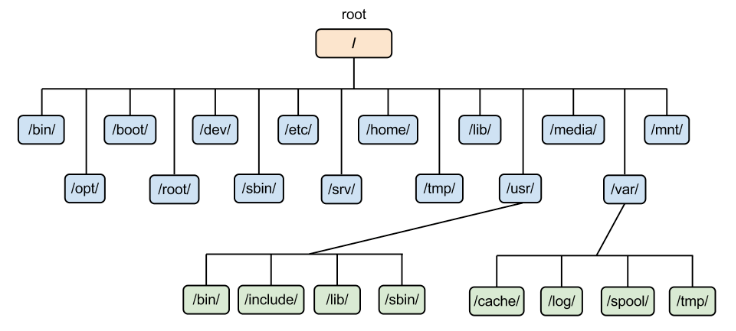
Figure 1. One tree from / — not every branch fails equally often.
/proc — live process introspection
/proc is a virtual filesystem: no disk blocks, kernel-generated files reflecting runtime state. This is where you answer “what is the process doing right now?” without recompiling.
Common debugging paths:
cat /proc/<pid>/status      # state, uid, memory summary
ls -l /proc/<pid>/fd        # open file descriptors
cat /proc/<pid>/maps        # memory mappings
cat /proc/cpuinfo           # core count, features (also used by Android NDK probes)
Symptom → check:
| Symptom | /proc starting point |
|---|---|
| Mystery open socket | /proc/<pid>/fd + readlink |
| Memory growth | /proc/<pid>/smaps or status |
| Thread hung | /proc/<pid>/stack, wchan in status |
| Kernel tunables | /proc/sys/... (writable on many knobs) |
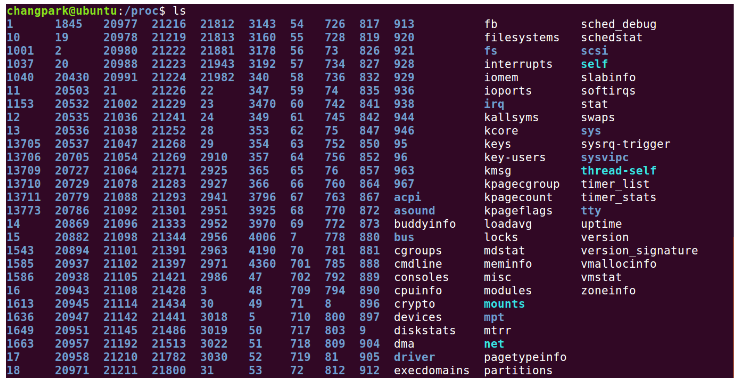
Figure 2. /proc — process IDs as directories, kernel stats as files.
Treat /proc/<pid>/ as read-mostly telemetry. Writing exists (/proc/sys, some cgroup files) but the default debug loop is observe, not mutate.
/etc — config mistakes outlive the editor
/etc holds host-specific configuration — text files and scripts, not the heavy binaries in /usr. Package managers own many files here; hand-edited changes survive upgrades poorly unless managed (debconf, /etc/alternatives, config management).
Failure modes:
- Syntax error in a unit file —
systemctl restartfails; fix under/etc/systemd/system/ - Wrong path in
/etc/fstab— boot drops to emergency shell - Stale credential in
/etc/shadowor app conf — auth works in dev, fails in prod - Assuming
/etcis portable — it is not; clone/varor/homeinstead when migrating
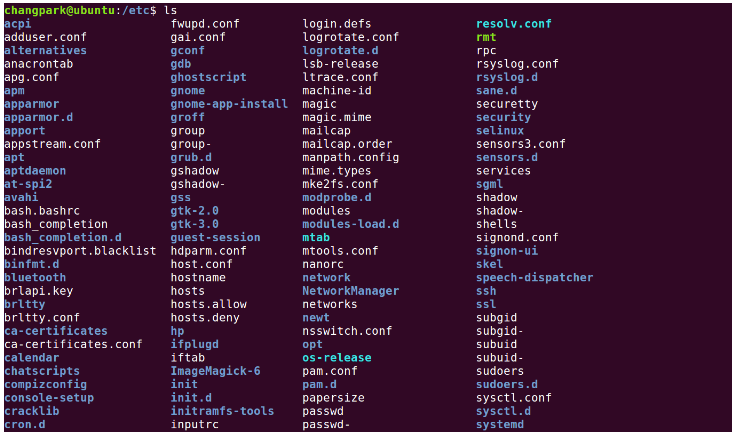
Figure 3. /etc — small text files with large blast radius.
Rule of thumb: if a change requires reboot or daemon restart to “take effect,” you probably edited /etc, not your project tree.
/var — where disks actually fill
/var is for mutable data — logs, spools, caches, package state, databases. It grows. Backups and monitoring often ignore it until df -h turns red.
Watch these:
du -sh /var/log/* /var/cache/* /var/lib/*
journalctl --disk-usage          # systemd journal lives under /var/log/journal
| Subpath | Typical pain |
|---|---|
/var/log |
Unrotated logs, debug left on in production |
/var/cache |
Package and app caches ballooning |
/var/lib |
DB files, Docker layers (if rooted here), app state |
/var/tmp |
Large temp files surviving reboot (unlike /tmp on some setups) |

Figure 4. /var — the directory that eats disks quietly.
Android devs on Linux workstations hit the same pattern: Gradle caches under ~/.gradle and emulator images under /var/lib — check both when “no space left on device” appears mid-build.
What to learn next (when you need it)
/dev— device nodes; permissions wrong →Permission deniedon hardware/tmpvs/var/tmp— ephemeral vs survives reboot; security implications for sticky bit/home— user data; backup target, not/etc/usr— bulk of packaged software; read-only on immutable distros
Learn these when a bug points there — not upfront.
References
man 5 proc,man 7 hier— Linux manual pages- systemd.file-hierarchy(7) — modern distro layout notes
- hier(7) — traditional layout notes alongside FHS