
Prerequisites
Read these first if React Native bridge, Flutter rendering, WebView hybrids, or MAUI are new.
- React Native — Architecture overview — JS ↔ native bridge / New Architecture
- Flutter architectural overview — Dart, engine, Skia/Impeller
- WebView on Android — embedding web UI in an app
- .NET MAUI — single-project cross-platform UI model
One codebase — two very different architectures
“Cross-platform” usually means “write once, run on iOS and Android.” That promise hides a fork: does your UI run in a WebView, or does JavaScript/Dart/C# call into native widgets (or draw its own)? Teams that miss this distinction budget for React Native and ship something closer to Cordova — then wonder why scroll and keyboard feel wrong.
In 2022 the question for small teams was cost and reuse across Flutter, Xamarin, React Native, and Titanium. The comparison still holds on intent; the market moved on status. Xamarin became .NET MAUI; Appcelerator Titanium is effectively legacy. Flutter and React Native absorbed most greenfield cross-platform work. What has not changed is the hybrid-vs-native-bridge confusion — still the most common misunderstanding in mobile architecture threads.
The four options
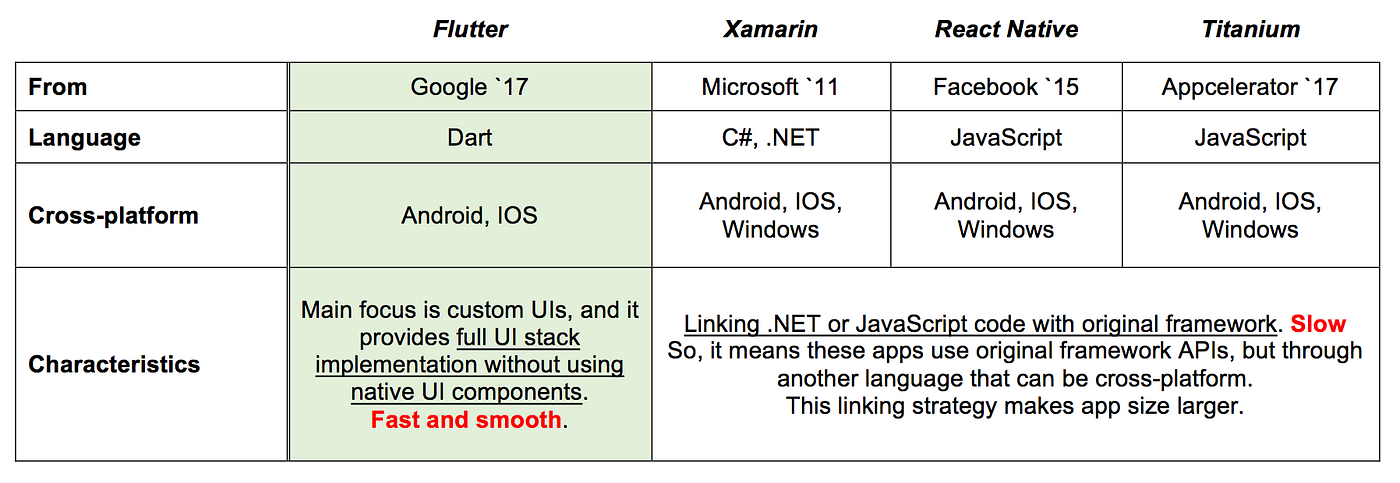
Figure 1. Language, UI model, and platform linkage for four cross-platform options (2022 snapshot).
Flutter (Google, Dart)
Renders its own widget tree via Skia/Impeller — no platform UI components by default. UIs look identical on iOS and Android, which helps design systems and reduces “why does this look different on Pixel?” bugs.
Tradeoff: platform-specific polish (SF Symbols quirks, Material motion on older Android) takes extra work. Plugins that wrap native SDKs often require platform-specific code that does not share across iOS and Android.
React Native (Meta, JavaScript/TypeScript)
Maps React components to native views through the bridge (and increasingly the New Architecture’s JSI). Feels closer to platform defaults; accessibility and text often inherit OS behavior for free.
Tradeoff: bridge overhead and layout surprises on complex lists; heavy reliance on npm means you inherit native module quality from the community.
Xamarin / .NET MAUI (Microsoft, C#)
Xamarin.Forms mapped C# to native controls — similar linkage model to React Native. Microsoft has consolidated the story into .NET MAUI; new enterprise Microsoft shops should start there, not greenfield Xamarin. Strength: deep .NET ecosystem and enterprise tooling; weakness: smaller mobile-native hiring pool than JS or Dart.
Titanium (Appcelerator, JavaScript)
Also bridged JS to native APIs without WebView, popular in enterprise a decade ago. Maintenance and community have shrunk; treat it as a historical reference when reading older comparisons, not a 2026 default.
Third-party libraries — where “shared code” stops
Class-library-heavy apps (maps, payments, analytics, ML) hit the same wall on every bridge framework: the shared layer ends at the plugin boundary. Flutter’s federated plugins and React Native’s native modules both push you to write Swift/Kotlin for anything non-trivial. Flutter’s table in Figure 1 is optimistic about reuse; in production, plan for platform folders.
Symptom: the demo compiles in a week; the payment SDK integration takes a month per platform.
Hybrid WebView is not cross-platform native-bridge
This is the confusion worth a whole section:
| React Native / Titanium / Flutter (mostly) | Ionic / Cordova / PhoneGap | |
|---|---|---|
| UI runtime | Native views or custom engine | HTML/CSS/JS in WebView |
| Scroll/lists | Platform or engine recycling | Browser layout |
| Typical pain | Bridge, plugin gaps | Scroll jank, keyboard, memory |
All may use JavaScript. Only the second column is a hybrid app in the sense of Types of Mobile Apps. Marketing pages that lump “JavaScript mobile” together cause teams to pick the wrong tool.
User tap
   │
   ├─ RN/Titanium ──► JS bundle ──► native view tree
   │
   └─ Ionic/Cordova ──► JS ──► WebView ──► browser layout engine
How to choose (2026-aware)
| Team / product | Reasonable first pick |
|---|---|
| Strong web/React, startup speed | React Native |
| Custom UI, design-system control | Flutter |
| Microsoft stack, enterprise LOB | .NET MAUI |
| Web app already shipped, thin native shell | Ionic/Capacitor (know the WebView ceiling) |
| List-heavy, ads, platform text fields | Native Compose/SwiftUI (cross-platform may fight you) |
Answer the UI-runtime question before the language question. Whether pixels come from a WebView, from native views, or from an engine drawing its own widgets is what sets your ceiling on scroll, keyboard, and text behavior — and it is the one thing “write once” marketing never says out loud.
Related reading
- Internal: Types of Mobile Apps
- Docs: Flutter — platform channels; React Native — New Architecture
- Articles surveyed: Impact Tech Lab Flutter vs React Native vs Xamarin — useful feature matrix, notes Xamarin deprecation; Tempest House on Titanium vs RN vs Ionic — good for the WebView vs bridge distinction.