
Prerequisites
Read these first if UID isolation, SELinux, scoped storage, or permissions are new.
- Application sandbox — UID isolation between apps
- SELinux on Android — mandatory access control beyond Unix permissions
- App permissions overview — runtime grants vs sandbox boundaries
- Scoped storage — how shared storage access changed
The symptom that looks like a bug
A teammate once insisted a mail client “could not see” another app’s attachment cache — as if Android were broken. It was not. Two apps with different Linux UIDs cannot read each other’s private directories. That is the sandbox working. Confusion started because a debug build on an older test image used a shared certificate path that blurred the mental model.
The sandbox is not a Java policy you opt into. It is kernel-enforced UID separation plus permissions, SELinux, and explicit IPC when data is meant to cross app boundaries.
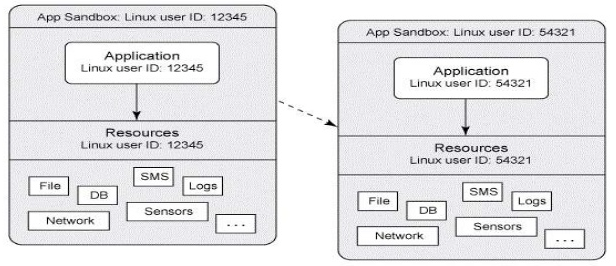
Figure 1. Each app runs in its own sandboxed process.
UID per app — the baseline contract
At install time Android assigns the app a unique Linux UID (and GID). The process runs as that user. Files under /data/data/<package>/ (or /data/user/0/<package>/ on multi-user devices) are owned by that UID with private permissions — other apps get EACCES if they try to open them directly.
Only processes sharing a UID can access each other’s sandboxes freely. That is rare on modern builds and almost always a deliberate (legacy) choice.

Figure 2. Different UIDs — no direct peering into another app’s data.
Google’s own framing still holds: the application sandbox is strong on a properly configured device, but breaking out requires compromising lower layers — ultimately the Linux kernel on a stock, locked-down phone. That is why kernel hardening and verified boot matter for high-assurance work — the same threat model I cared about in Rushmore, where display integrity depends on what even a compromised app process is allowed to touch.
Permissions — capability grants, not shared folders
Runtime permissions (CAMERA, READ_MEDIA_*, POST_NOTIFICATIONS, etc.) gate access to shared system resources. Granting camera access does not merge sandboxes; it lets your UID talk to the camera service through a mediated API.
Common mistakes:
- Assuming
READ_EXTERNAL_STORAGEmeans you can read another app’s internal storage (it does not). - Forgetting that scoped storage changed which paths exist at all on modern API levels.
- Declaring a permission in the manifest without handling denial — the framework throws or returns empty, and the “bug” is missing UX, not sandbox failure.
sharedUserId — legacy escape hatch
android:sharedUserId (and signing with the same key) made two APKs run as one UID, sharing data and Linux identity. Google deprecated this path; new apps should not rely on it.
If you inherit an enterprise suite still on sharedUserId, treat it as one merged sandbox — a vulnerability or backup leak in app A is app B’s problem too. Prefer explicit ContentProvider / FileProvider sharing with signature permissions instead of collapsing UIDs.
SELinux — mandatory access control on top of UID
Since Android 4.3+, SELinux labels processes and files with types (untrusted_app, isolated_app, etc.) and enforces allow rules the kernel checks even when DAC (Unix permissions) would permit access. Android 9+ pushed per-app SELinux domains for third-party apps with targetSdkVersion >= 28.
Symptom pattern: avc: denied lines in dmesg / Logcat during a feature that “should work” — you hit a MAC rule, not a missing Java try/catch. run-as works in debug; production builds stay confined.
Exported components — holes you drill yourself
The sandbox is tight by default. You widen it:
android:exported="true"on activities, services, receivers, or providers without a permission — any app can launch or query them.- Deep links and implicit intents that accept untrusted input.
FileProviderpaths that expose parent directories too broadly.- World-readable legacy flags on files (avoid; modern defaults are private).
A malicious app does not need kernel exploits to steal data if your app exports a provider that returns attachments without checking the caller.
<!-- why: lock down unless another app truly must launch this -->
<activity
    android:name=".DeepLinkEntry"
    android:exported="true"
    android:permission="com.example.SIGNATURE_ONLY" />
Review merged manifests on every release. Library SDKs sometimes export components you never noticed.
Crossing boundaries the intended way
When sharing is required, use system-mediated channels:
ContentProviderwithgrantUriPermissionsor signature protection- Explicit intents to known packages
- Binder/AIDL services with permission checks in
onBind - User-driven flows (SAF picker) instead of direct path access
Each path keeps the kernel UID wall intact while allowing controlled collaboration — the design mail clients and browsers rely on every day.
Symptom vs cause
Most “the sandbox is broken” reports resolve to a short list:
| Mistake | What actually happened |
|---|---|
“Cannot read other app’s /data” |
Sandbox OK — use a share API |
| Data leak after SDK update | New exported component in merged manifest |
| Works with debug cert only | Signature permission mismatch in release |
avc: denied on file create |
SELinux context / path policy |
None of those are the sandbox failing. The default is tight; what leaks is what you declared. Audit the merged manifest and read the avc line before assuming the platform is wrong.