
Prerequisites
Read these first if Compose as UI = f(state), the View system, or recomposition are new.
- Compose mental model — describe UI from state; the runtime reconciles
- State and Jetpack Compose — why stale UI is usually a source-of-truth bug
- Layouts in Views — inflate once, hold references, call setters (the imperative side)
- UI layer (Android architecture) — where declarative UI sits in the recommended app structure
The screen that stopped updating
The first Compose bug I chased on a real screen was not a missing import. The UI looked correct on first load, then stopped updating after a network refresh. The list adapter had new data; the composable tree did not. That is when imperative vs declarative stops being textbook vocabulary.
Claim: mixing View mutation and Compose state ownership causes production bugs. The useful question is not “which is better?” but where state lives and who is allowed to change the UI.
In the View system you mutate widgets: find a TextView, call setText. In Compose you describe UI from state and let the runtime reconcile. Mix the two mental models on one feature and you get stale UI, duplicated sources of truth, or recompositions that never fire.
Two contracts, one contrast
Classic Views inflate a hierarchy once, hold references, and push updates:
myTextView = findViewById(R.id.myTextView)
myButton.setOnClickListener {
    myTextView.text = "Button clicked!"  // poke the widget
}
This works until state spreads: loading flags in the Activity, partial updates in an adapter, a ViewModel that also thinks it owns the same text. Debugging means tracing who last wrote the widget.
Compose flips the contract. Composables take inputs and emit UI; when inputs change, Compose recomposes:
@Composable
fun GreetingScreen() {
    var text by remember { mutableStateOf("Your text here") }
    TextField(value = text, onValueChange = { text = it })
}
There is no setText on a retained instance. If text is not observable state, async updates appear to “do nothing.” That is the declarative equivalent of forgetting a View setter — except the compiler will not save you unless you wire state correctly.
Data binding and “more declarative” XML move the update trigger (android:text="@{viewModel.myText}") without changing the runtime model: something still notifies the binding. Migrating a bound XML screen to Compose is not line-for-line translation — you redesign what is state and what is derived UI.
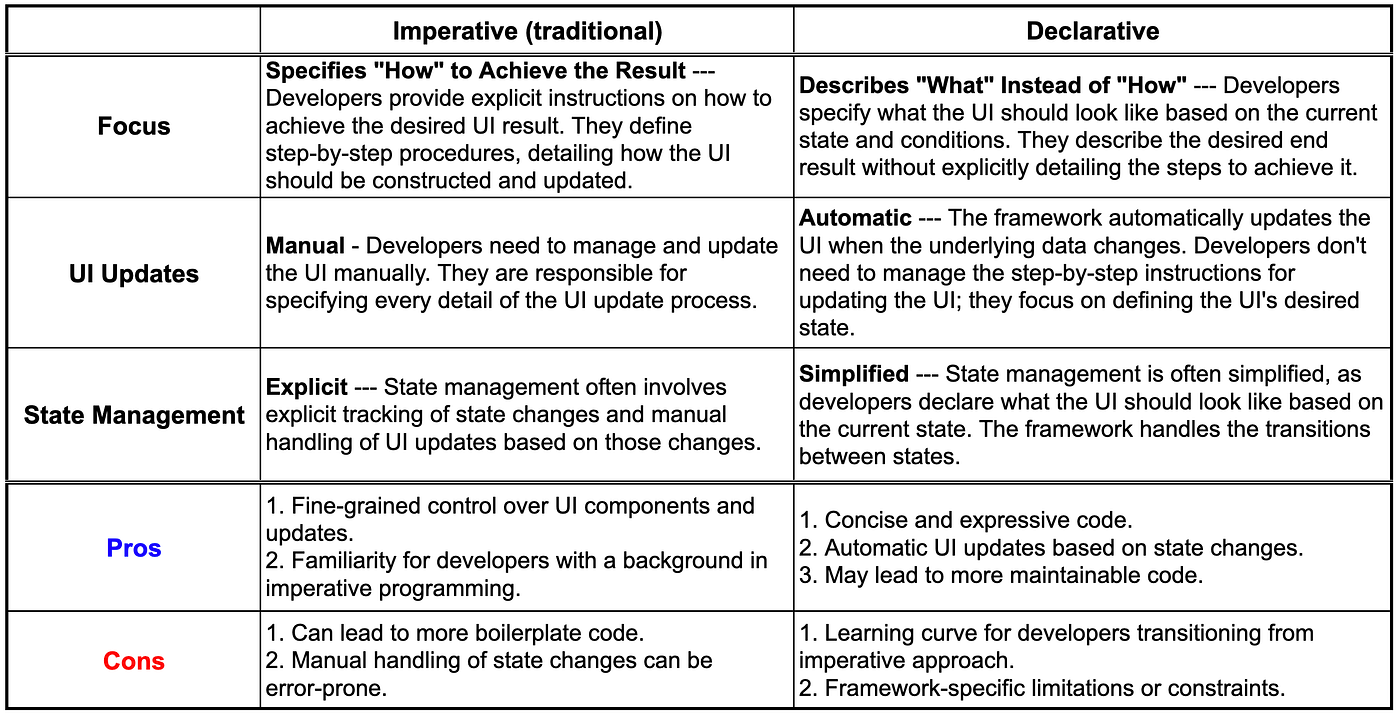
Figure 1. Update model and state ownership — the migration axes that matter.
Migration pain is the proof
Moving high-traffic surfaces from XML/adapters to Compose surfaces the same bugs:
- Dual writers — ViewModel updates data but nothing observable triggers recomposition (fix:
StateFlow/collectAsStateWithLifecycle) - Identity churn in lists — unstable keys cause scroll jank and state loss (fix: stable
keyinLazyColumn) - Side effects in composables — network calls in
@Composablebodies (fix:LaunchedEffect, ViewModel) - Assuming XML lifecycle tricks port —
onSaveInstanceStatemaps torememberSaveable, not copy-paste
Compose is not a day-one full replacement. Imperative Views still win for SDK gaps (ads, maps via AndroidView), incremental migration (ComposeView), and some hand-tuned drawing. Hybrid screens are normal. The discipline is boundary design: pass state down, events up; do not let an Activity silently findViewById while a sibling composable drives the same field.
The declarative win is not fewer lines on paper. It is one directional data flow from state to UI — which scales when multiple engineers touch the same screen over years. If a refresh leaves the UI frozen, ask which writer owns the field before you blame Compose or XML. The paradigm only matters when it tells you who is allowed to change what you see.
References
- Using Views in Compose —
AndroidViewinterop - Using Compose in Views —
ComposeViewfor incremental migration